
Finding campaigns
Query the campaigns endpoint for campaign rules, budgets, and configuration
While the opportunities endpoint provides high-level metrics about what's being incentivized, the campaigns endpoint offers detailed campaign rules (duration, budget, campaign type, customization options, etc.). Use this endpoint to display in-depth campaign information to your users.
For a complete list of available filters, see the campaigns endpoint documentation.
Recommended filters:
By Creator Address - Find all campaigns created by a specific address:
https://api.merkl.xyz/v4/campaigns?creatorAddress={address}Example: https://api.merkl.xyz/v4/campaigns?creatorAddress=0xdef1FA4CEfe67365ba046a7C630D6B885298E210
By Token Symbol - Find all campaigns distributing a specific reward token:
https://api.merkl.xyz/v4/campaigns?tokenSymbol={symbol}Example for campaigns distributing $PYTH: https://api.merkl.xyz/v4/campaigns?tokenSymbol=PYTH
Excluding sub-campaigns - Find all campaigns except sub-campaigns created by parent campaigns due to reward forwarding
https://api.merkl.xyz/v4/campaigns?excludeSubCampaigns=trueBy Campaign List - Find all campaigns tagged in one of your custom campaign lists:
https://api.merkl.xyz/v4/campaigns?campaignLists={name}&listOwner={owner}What are sub-campaigns?
Sub-campaigns are automatically created through reward forwarding when Merkl's engine detects that rewards should be distributed to end users rather than intermediate contracts.
Example: When incentivizing a Curve pool, if the engine detects that one of the LP token holders is actually a Curve gauge contract, it will automatically create a sub-campaign to properly distribute rewards to the users who staked in that gauge, rather than to the gauge contract itself.
How to identify sub-campaigns:
Check the campaignId field in the API response:
- Root campaign:
campaignIdstarts with0x(e.g.,0xabc123...) - Sub-campaign:
campaignIdis a numeric value (e.g.,123456789)
Best practice: When querying campaign rewards, always use the root campaign ID. The root campaign's rewards data automatically includes all rewards from its sub-campaigns, giving you a complete picture of the total distribution.
Retrieving both campaign and opportunity data
The campaigns endpoint provides campaign-specific information but not upstream opportunity data. Similarly, querying for an opportunity doesn't include downstream campaign details. To retrieve all information in a single request:
Search campaigns with related opportunities - Use /v4/campaigns with withOpportunity=true:
https://api.merkl.xyz/v4/campaigns?withOpportunity=trueSearch opportunities with related campaigns - Use /v4/opportunities with campaigns=true:
https://api.merkl.xyz/v4/opportunities?campaigns=trueLearn more about how TVLs, APRs, and daily rewards are computed and why they may differ between the campaign and opportunity levels.
About campaign IDs
Merkl uses two distinct identifier types for campaigns:
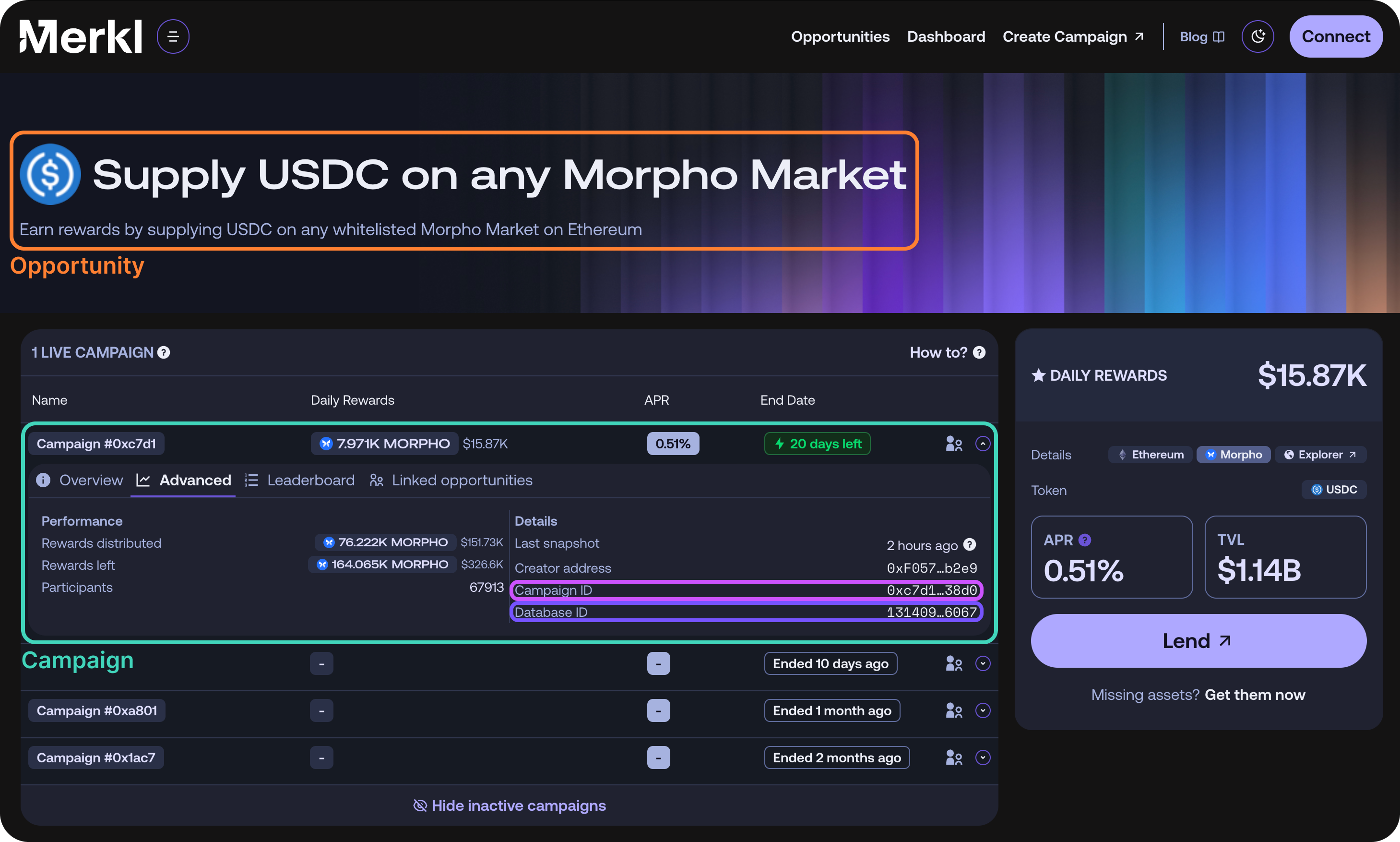
campaignId(format:0x...): The onchain identifier of a campaign. Note that this is not unique across chains: multiple campaigns on different chains may share the samecampaignId. You can find this in the opportunities page by selecting an opportunity, viewing campaign details, and navigating to the "Advanced" tab.id(format: numeric, e.g.,13972358188887408622): The unique database identifier used for most API routes. You can retrieve this by querying the campaigns endpoint with acampaignId. You may also find a campaign's database ID under the advanced tab of a campaign on the Merkl app.
Tagging campaigns with lists
Campaign lists let you group arbitrary campaigns under a name you own (e.g. featured, partners-q2, mainnet-launch), then filter the /v4/campaigns endpoint by that tag. Lists are scoped to your API key owner, so two integrators can each maintain a list called featured without collision.
Prerequisites
- Generate an API key from the Merkl Developer Portal.
- Include it as
X-API-Keyon every request to the list endpoints (see Auth & rate limits).
The {owner} path parameter must be the same address that was used to create the API key. Requests where {owner} doesn't match the address tied to your X-API-Key will be rejected. This is what scopes a list (e.g. featured) to you and prevents other integrators from writing to it.
Campaign list ID
Lists store campaigns by a deterministic identifier derived from the campaign's chain and onchain campaignId:
id = hash(`${chainId}${campaignId}`).toString()You can also retrieve this value directly as the id field of any campaign returned by /v4/campaigns.
Add a campaign to a list
If the list doesn't exist yet, it's created automatically on the first add.
curl -X POST https://api.merkl.xyz/v4/campaign-lists/{owner}/{name}/add \
  -H "X-API-Key: your-api-key-here" \
  -H "Content-Type: application/json" \
  -d '{
    "campaignIds": [
      "5821552044504491915"
    ]
  }'
Remove a campaign from a list
Same body shape as the add endpoint.
curl -X POST https://api.merkl.xyz/v4/campaign-lists/{owner}/{name}/remove \
  -H "X-API-Key: your-api-key-here" \
  -H "Content-Type: application/json" \
  -d '{
    "campaignIds": [
      "5821552044504491915"
    ]
  }'
List your lists
https://api.merkl.xyz/v4/campaign-lists/{owner}Get the campaigns inside a list
https://api.merkl.xyz/v4/campaign-lists/{owner}/{name}Filter campaigns by list
Once a list is populated, pass its name and owner to /v4/campaigns to retrieve only the tagged campaigns. Both parameters are required: campaignLists selects the list name, listOwner scopes it to the address that owns the list.
https://api.merkl.xyz/v4/campaigns?campaignLists={name}&listOwner={owner}&items=100Example:
https://api.merkl.xyz/v4/campaigns?campaignLists=base-incentives&listOwner=0xEb853F14daDb92752151a087F29ad2690eCb35A4&items=100